Client Facing Usage Report
Product Suggestion
Introduce a client-facing usage report that allows authorised users to review which internal users are actively logging in and using Heresafe.
The report should show user activity alongside role information, making it easier for administrators to audit access and identify users who may no longer need system access.
Problem Statement
Administrators need a clearer way to review internal user activity and permissions without checking each user profile individually.
Without a central report, it can be harder to see which users are active, which users have not logged in recently and what access they have across different workspaces.
Suggested Improvement
Add an Internal User Report to the Reports menu.
The report should provide a read-only overview of internal system users, including:
user name and email address
activity details, such as last login and number of logins
global roles
roles by workspace
role search/filtering
export functionality
When exported, roles should be split into separate columns for each workspace, making it easier to review user access across multiple workspaces.
The report should only include internal users and should not include contacts, contractors or external portal users.
Potential Benefits
Improved visibility of internal user activity
Easier auditing of user access and roles
Faster identification of inactive users
Clearer workspace-level role review
Reduced manual checking of individual user profiles
Exportable role information for access reviews
Comments3
Keiron McGrath
May 18
•Merged request
•5 votes
Self serve ability to export a full list of users and their permissions
Having a report/export functionality which gives you the ability to extract a list of all users and their permissions on the system.
✨ Update!
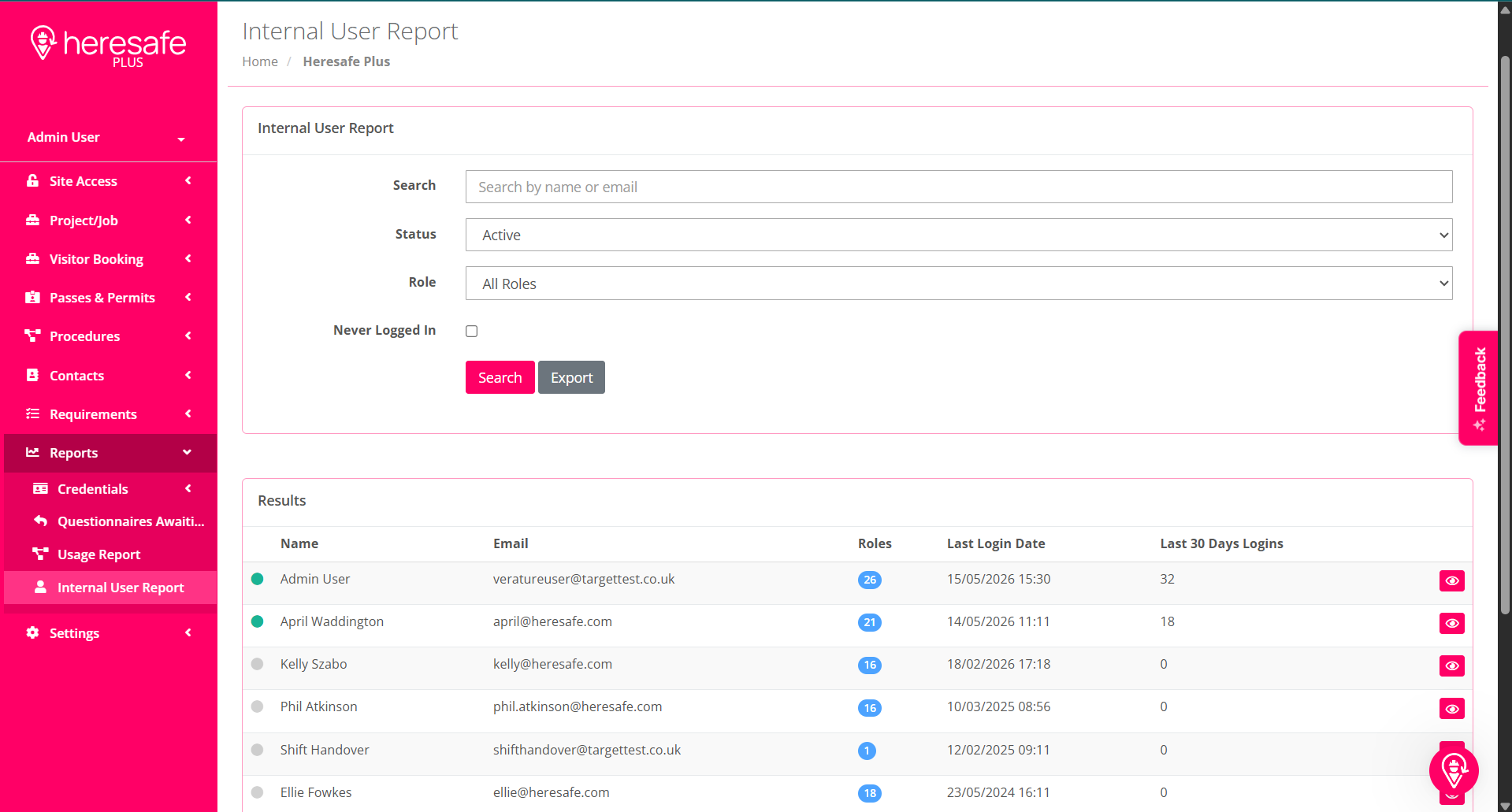
A new Internal User Report has been added to the Reports menu to help authorised users review internal user access more easily.
The report provides a read-only overview of internal system users, including their activity, assigned global roles and roles by workspace. This gives administrators a clearer way to audit user access, check who is active and export role information without having to review each user individually.
The report includes:
User name/email address
User activity details, including last login and number of logins
Global roles
Roles by workspace
Role search/filtering
Export functionality
When exported, roles are split into separate columns for each workspace, making it easier to review user access across multiple workspaces.
The report only includes internal users and does not include contacts, contractors or external portal users. It is read-only, so user access can be reviewed and exported from the report, but not edited there.
Access to the report is available automatically to users with the relevant user administration access.
Kelly Szabo
May 15
✅ This feature is now live and available within the system.
Thanks for helping shape the platform with your feedback.
Kelly Szabo
May 15
✅ This feature is now live and available within the system.
Thanks for helping shape the platform with your feedback.